How Loopin works

Everyone’s in.
Everything adds up.
Split trips, flats and life as a couple. Free, no ads.

Make a group, bring everyone in
- 1Tap New group and pick what it’s for: Trip, Home, Couple, The Pot (card nights) or Anything Goes. Collecting for a gift or a booking? Collect is right there too. Give it a name (“Euro trip”) and a currency. First time? Sign in with Google or your email in 30 seconds (no password). Next time, one touch with your fingerprint or face.
- 2Add people: friends already on Loopin, people from your contacts, or anyone by email.
- 3Or share the group’s link or QR code. People confirm their email and they’re in, and show up on the People screen. From then on everyone is told about every change.
Someone shows as not on Loopin yet (brought over from another app, say)? Tap their name on People and invite them by email. They sign up and take over that name, with all its expenses.

Add an expense in seconds
- 1Tap the + at the bottom.
- 2Pick who paid, type what it was and how much. Loopin tags it for you (🍽️ Bites & Sips, 🚕 Wheels & Wings, 🏨 Beds & Bunks…).
- 3Choose how to split: Everyone equally, Only some people, or Custom (exact amounts, % or shares, like 2 : 1 for a bigger room).
Change the date if it wasn’t today, and add a note if it helps (“Sam paid the tip”). Next time, Loopin starts with the same split you used last.
Two people paid? Choose More than one payer. Got money back (a refund, a returned item)? Switch to Money back and it’s shared the same way. Adding a few in a row? Save & add another. The same thing again? Open it and tap Repeat. Loopin warns you if something looks like a duplicate.
In a hurry? Tap Type it in one line: “Dinner 2400 Sam paid split with Maya Leo” or “Cab 600 except Leo” fills in the form for you to check. Nothing saves until you tap Save.
→ Sam, Priya and Leo each owe Maya $30.

Trip mode on. Maths mode off.
Ramen in Shibuya, paid on your card in yen? Loopin converts it at today’s rate, adds the fee your bank quietly charges, and splits it. Nobody does maths at the table, and the person who paid isn’t secretly out of pocket.
🍜 Ramen in Shibuya · paid by card
- ¥6,000 at today’s rate
- $40.20
- Your bank’s 3% card fee
- + $1.21
- Split four ways
- $10.35 each
150+ currencies. Cash? No fee added. Better rate from the exchange booth? Type it in.

Trains, cabs and tickets
Not everyone took the same train? Use Only some and tap the people who did. A ticket for one person? Choose Custom → One person. Everyone else’s balance stays untouched.

Who owes what, and why
Home shows your net balance across all groups, and a Needs attention list: who owes you, who you owe, and what changed.
Not sure about a number? Tap Why? under any balance. You’ll see every expense and payment behind it, including card fees, and it always adds up exactly.
Looking for something? Recap (in the bottom bar) charts your spending by week, month or year, shows where it went, and finds any expense across your groups. Charts show where the money went, with a few plain lines on top (“Bites & Sips is 42% of all spending”). Download in a group’s settings gives you its expenses as a spreadsheet; Download all my data on the You page gives you every group in one file.

Settle up with the fewest payments
- 1In a group, tap Settle up. Loopin shows the fewest payments that clear everything.
- 2Paid in full? Tap Mark paid. Paid part? Change the amount first.
- 3Your friend added their UPI ID or PayPal / Venmo link? A Pay button opens the app with the amount filled in.
- 4Someone owes you? Tap Remind: WhatsApp opens with a friendly note, your UPI ID and an I’ve paid link. They pay and tap it, no app or sign-in needed.
- 5Whoever was paid is asked Got it ✓ or Not received, so a payment only stays if it really arrived.
- 6Owe the same friend in two groups? The Settle tab combines them into one payment.
Loopin only records payments. It never moves money and never asks for bank details.
Trip over? The trip in numbers
Open Charts → Trip report: the total, per person and per day, where it went, the biggest expense, who paid most and what’s left to settle. Share to WhatsApp sends it as a picture with a short message. There’s no link to the group, so only what’s in the picture leaves your phone.
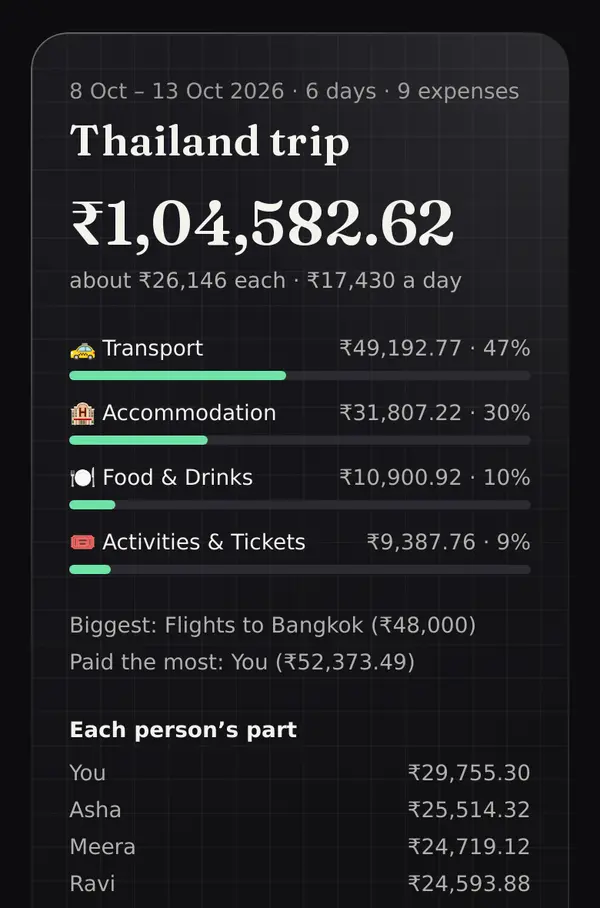
Then settle up and close the group. It stays in your history, and so does the report.

Flatmates: the flat runs itself
Make a Home group. It opens on This month: your share, the flat’s total, who owes whom and what’s coming up.
- 1Bills on repeat. Set rent and Wi-Fi, streaming to repeat monthly once, and Loopin adds each one on the day (anyone can undo or skip a month). Nothing is read from your bank or messages. Electricity changes? Whoever pays gets a nudge to enter the amount.
- 2Shopping list. Add what’s running low, tick what you bought, type what it cost: one Groceries expense, items in the note.
- 3Budgets and the deposit. A nudge when groceries reach 80%. The deposit is kept on record, never mixed into balances.
- 4Moving out or in. Loopin works out their share for the days they stayed, who takes over their deposit, and the final payments.
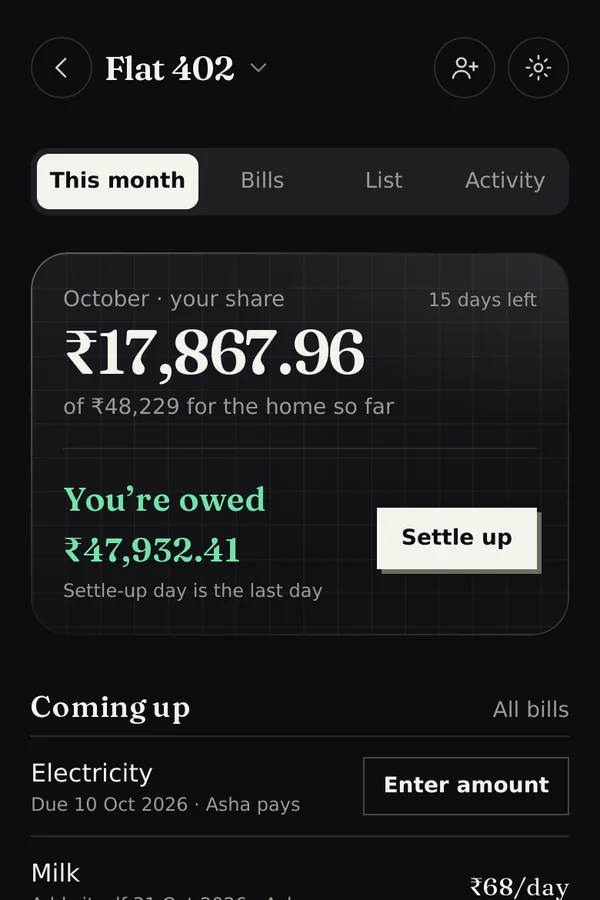
Reminders (the day before a bill, and on your settle-up day) are off until you switch them on in the group’s settings.
Couples: your split, not 50/50
Make a Couple group and set your split once: equal, a ratio, or worked out from your incomes (say 55 / 45). Every expense uses it unless you change that one.
This month shows what you spent together and whether you’re ahead or behind your share, with one tap to even out. Saving for something? Start a goal and each tap “I set money aside”. The money stays in your own accounts.
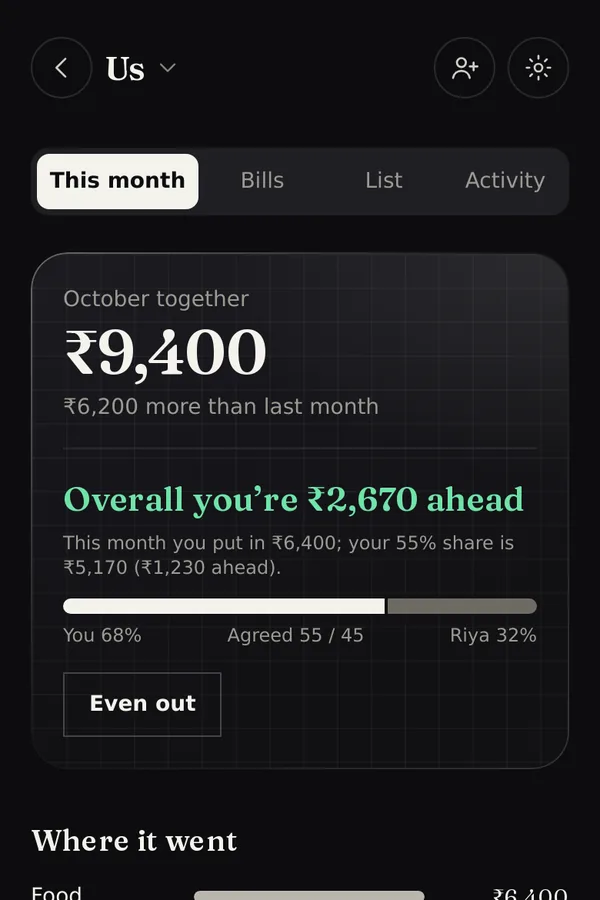
Card nights: The Pot keeps score
Playing Poker or Teen Patti? Make a group and pick The Pot. Add the players: friends on Loopin see the game and their balance; anyone else can just be a name (they can join with the link later).
- 1Start a game. Pick the game and who’s at the table. Whoever starts it is the host.
- 2Buy in. Everyone is ticked: pick an amount ($100) and tap once. Topping up later? Tick just those players. Anyone in the group can add money, and every line says who added it.
- 3Cash out, or swap a player. Someone leaving early taps Cash out with what they have. A new player can take the seat right there: just a name and their buy-in.
- 4Count the money. At the end, one table: type what each player has in front of them (0 if they lost it all). It shows who’s up or down as you type, and whether it adds up.
- 5It has to add up. If money is missing, or more came back than was taken, the game can’t finish until you find it, or the host fixes the difference (spread over everyone, or on one person) with a reason.
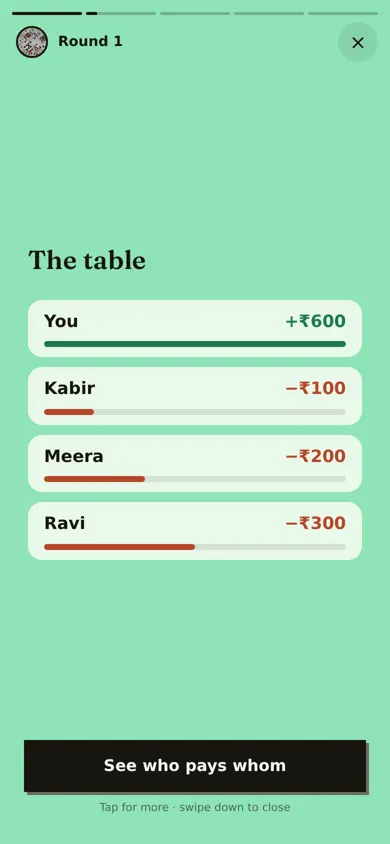
- 6Calculate & settle. The host taps it and gets the fewest payments to square up (“Meera pays Ravi $30”). The result goes into the group’s balances, so Settle up works as always. Every game stays in the history.
Loopin only keeps count, like a notebook at the table. It doesn’t run the game, track chips or bets, or hold or move any money.

Home, told as stories
The top of Home is a row of little polaroids. Each one is a story from your groups, a few slides you tap through: the countdown to a trip with photos of where you’re going and the crew, today’s spend while you’re away, last night’s card game with everyone’s result and who pays whom, a group that just got all square, and a trip from a year ago.


Trip over? Watch the Wrapped
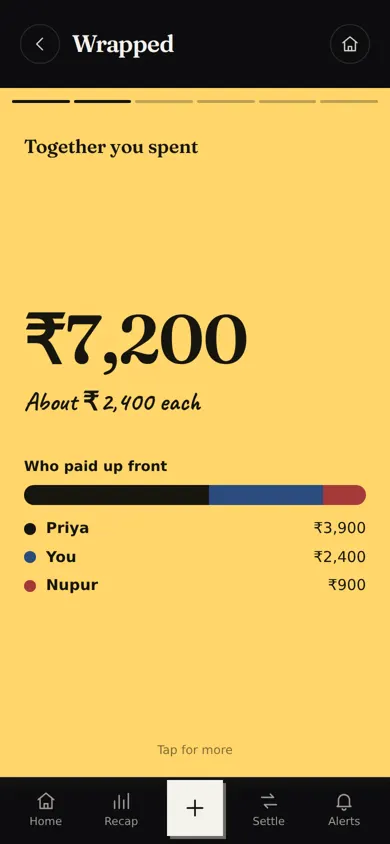
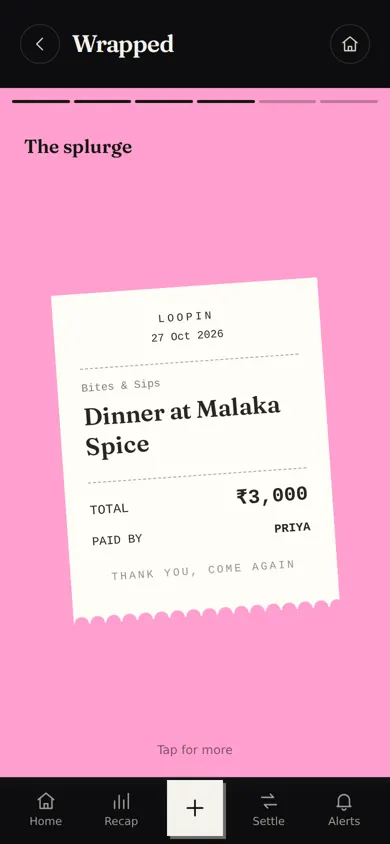
Every trip gets its own Wrapped: the total you spent together and who paid up front, where the money went, the biggest day, the splurge as a receipt, and everyone’s title. Open it from the group’s Charts (or from Home after the trip) and share it as a picture.

Your trip passport
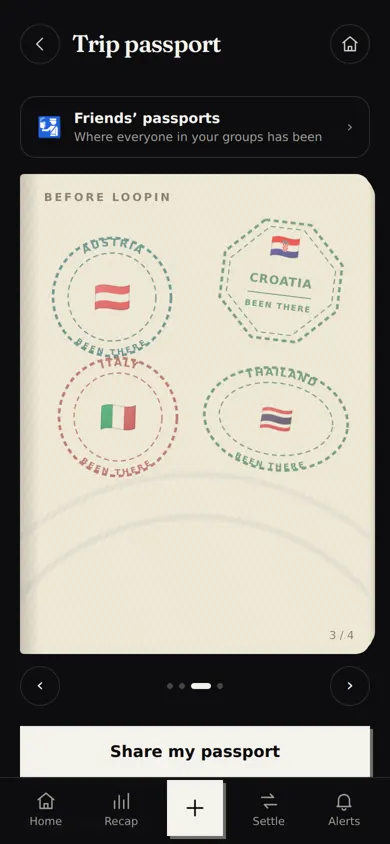
Every trip stamps your passport: a city stamp at home, a country stamp abroad. Add the countries you went to before Loopin with a few ticks. Open it from the You page, flip the pages, and share it to WhatsApp as a picture of your passport.
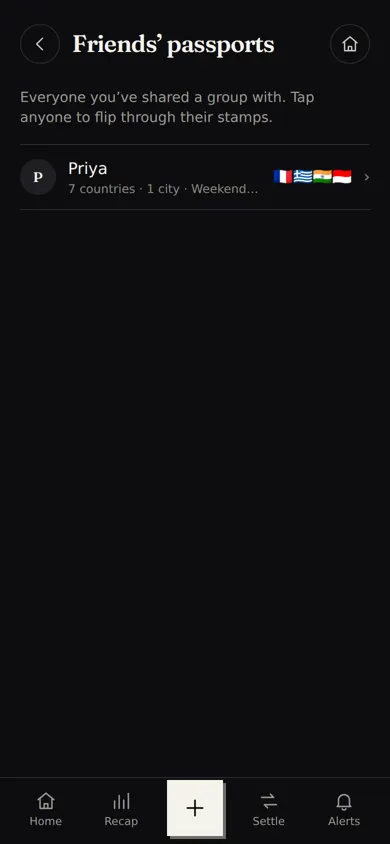
- 1Friends’ passports. Anyone you’ve shared a group with, even an old flat or a finished trip: You → Friends’ passports.
- 2Our passports. Inside any group: where you’ve all been together, with every flag.
- 3Empty passport? Nudge them. They’ll see it in Alerts, never as a push or email.
- 4Private when you want. Switch yours to Only me. Trips still happening stay hidden until they’re over.

Spin for it, titles and reactions
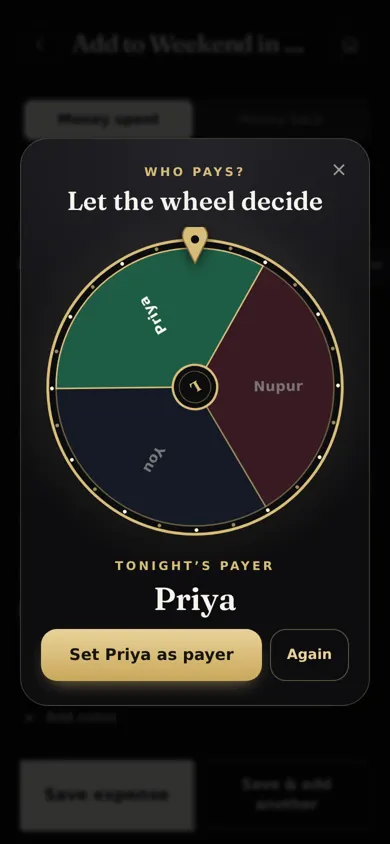
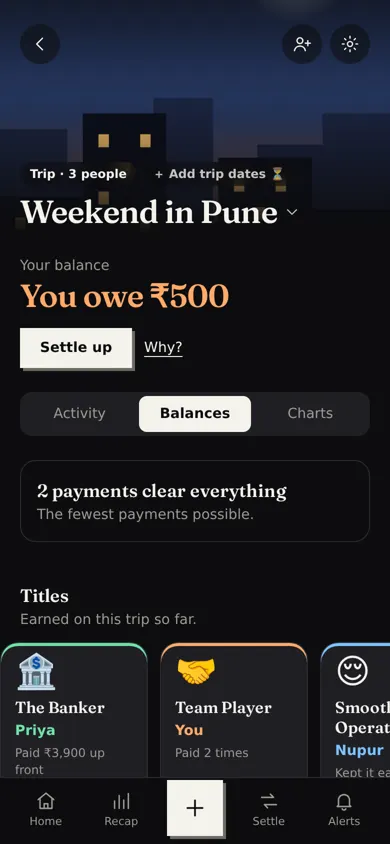
Can’t decide who pays tonight? On Add expense, tap Spin for it and let the wheel decide. Once a group has a few expenses, everyone earns a title (The Banker, Snack Lord, Night Owl…), and you can react to any expense with 😂 🔥 😭.
Collect: one link, see who’s paid
Gathering money for a gift, a farewell or a booking? Tap New group → Collect. Set the amount each, your UPI ID (or a pay link), and share the link in your WhatsApp group. People pay you directly, tick their name (no sign-up), and you tap Got it once you see the money. Friends on Loopin hear about it in the app.
Mistakes happen. Fix them.
Every change can be undone, and the history shows who changed what. Everyone in the group gets an alert; you choose which alerts per group in its settings.
You sign in with Google, your email (a code, no password) or your fingerprint or face, so your groups come back on any phone. Only people in a group can see it. No ads, and your data isn’t sold. Privacy
Coming from another app?
Export the group as a spreadsheet (CSV) from the other app (in Splitwise: the group → gear → Export as spreadsheet). In Loopin, tap Bring a group over and pick that file: every expense and payment comes across. Splitwise files are checked against their own totals; for other apps, you say which column is which. What’s different